
-
概念:AJAX(Asynchronous JavaScript And XML):异步的JavaScript和XML
-
AJAX作用:
-
与服务器进行数据交换:通过AJAX可以给服务器发送请求,并获取服务器响应的数据
- 使用了AJAX和服务器进行通信,就可以使用HTML+AJAX来替换JSP页面了
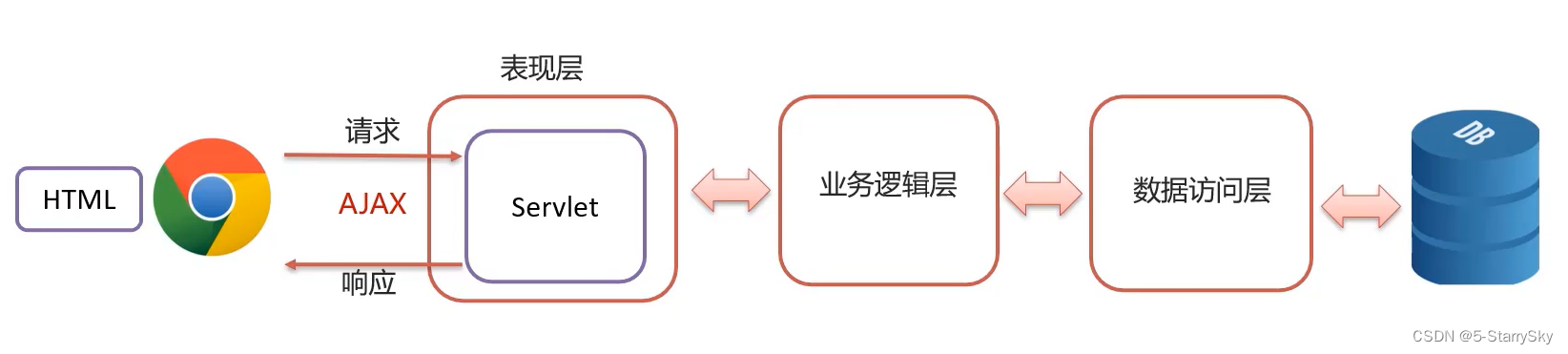

-
异步交互:可以在不重新加载整个页面的情况下,与服务器交换数据并更新部分网页的技术,如:搜索联想、用户名是否可用验,等等.…
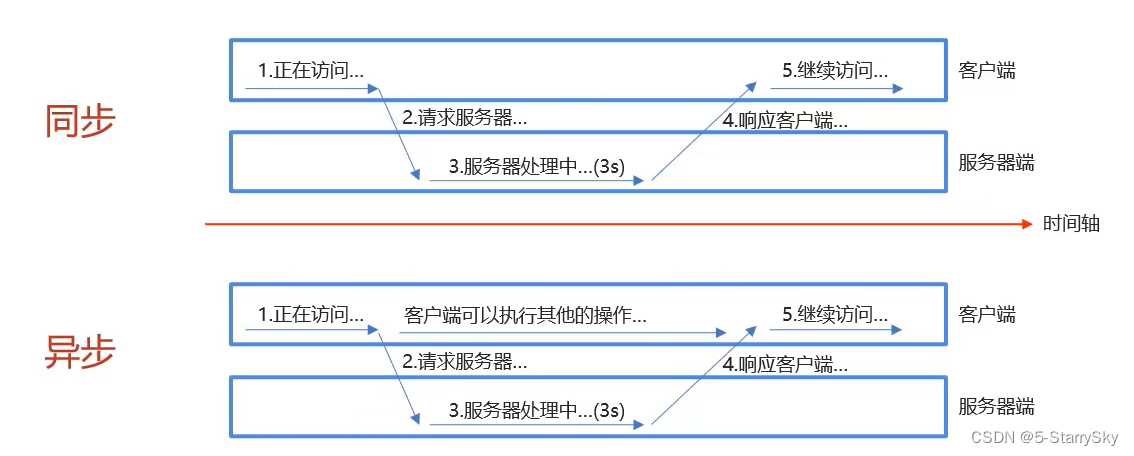
-
-
编写AjaxServlet,并使用response输出字符串
-
创建XMLHttpRequest对象:用于和服务器交换数据
var xmlhttp; if (window.XMLHttpRequest){ xmlhttp = new XMLHttpRequest(); }else{ xmlhttp = new ActiveXObject("Microsoft.XMLHTTP"); } -
向服务器发送请求
xmlhttp.open("GET","url"); mlhttp.send(); -
获取服务器响应数据
xmlhttp.onreadystatechange = function (){ if(xmlhttp.readyState ==4 && xmlhttp.status ==200){ alert(xmlhttp.responseText); } }
需求:在完成用户注册时,当用户名输入框失去焦点时,校验用户名是否在数据库已存在
前端代码如下:
document.getElementById("username").onblur = function (){ var username = this.value; var xhttp; if (window.XMLHttpRequest){ xhttp = new XMLHttpRequest(); }else{ xhttp = new Activexobject("Microsoft.XMLHTTP"); } xhttp.open("GET","http://localhost:8080/ajax-demo/selectUserServlet?username="+username); xhttp.send(); xhttp.onreadystatechange = function(){ if (this.readystate == 4 && this.status == 200){ if(this.responseText ="true"){ document.getElementById("username_err").style.display =''; }else{ document.getElementById("username_err").style.display = 'none'; } } }; } -
引入axios的js文件
<script src="js/axios-0.18.0.js"></script> -
使用axios发送请求,并获取响应结果
axios({ method:"get", url:"http://localhost:8080/ajax-demo1/aJAXDemo1?username=zhangsan" }).then(function (resp){ alert(resp.data); }); axios({ method:"post", url:"http://localhost:8080/ajax-demo1/aJAXDemo1", data:"username=zhangsan" }).then(function (resp){ alert(resp.data); });
为了方便起见,Axos已经为所有支持的请求方法提供了别名,修改过后会变成:
axios.get("url") .then(function (resp){ alert(resp.data); }); axios.post("ur","参数") .then(function (resp){ alert(resp.data); }); - 概念:JavaScript Object Notation。JavaScript对象表示法
- 由于其语法简单,层次结构鲜明,现多用于作为数据载体,在网络中进行数据传输
-
定义
var变量名={"key1":value1, "key2":value2, ... }; -
示例
var json = {"name":"zhangsan", "age":23, "addr":["北京","上海","西安"] }; -
获取数据
变量名.key json.name
Fastjson是阿里巴巴提供的一个Java语言编写的高性能功能完善的JSON库,是目前Java语言中最快的JSON
库,可以实现Java对象和SON字符串的相互转换。
使用:
-
导入坐标
<dependency> <groupId>com.alibaba</groupId> <artifactId>fastjson</artifactId> <version>1.2.62</version> </dependency> -
Java对象转JSON
String jsonStr = JSON.toJSONString(obj); -
JSON字符串转ava对象
User user = JSON.parseObject(jsonStr,User.class);
使用Axios+JSON完成品牌列表数据查询
<script> window.onload = function (){ axios({ method:"get", url:"http://localhost:8080/brand-demo/selectAllServlet" }).then(function (resp){ let brands = resp.data; let tableData ="<tr>\n"+ " <th>序号</th>\n" + " <th>品牌名称</th>\n" + " <th>企业名称</th>\n" + " <th>排序</th>\n" + " <th>品牌介绍</th>\n" + " <th>状态</th>\n" + " <th>操作</th>\n" + " </tr>"; for(let i = 0;i< brands.Length; i++){ let brand brands[i]; tableData += "\n" + " <tr align=\"center\">\n" + " <td>" + (i+1) + "</td>\n" + " <td>" + brand.brandName + "</td>\n" + " <td>" + brand.companyName + "</td>\n" + " <td>" + brand.ordered + "</td>n" + " <td>" + brand.description + "</td>\n" + " <td>" + brand.status + "</td>\n" + "\n" + " <td><a href=\"#\">修改</a><a href=\"#\">删除</a></td>\n" + " </tr>"; } }) } </script> 后端代码:
List<Brand> brands = brandService.selectAll(); String jsonString = JSON.toJSoNString(brands); response.setcontentType("text/json;charset=utf-8"); response.getWriter().write(jsonstring); 如果觉得文章对您有帮助,请帮忙点赞或者收藏,如果在文章中发现什么错误或不准确的地方,欢迎与我交流。
原创文章,作者:优速盾-小U,如若转载,请注明出处:https://www.cdnb.net/bbs/archives/30718